15 Must-Have Virtual Career Fair Platform Features

Imagine logging into a virtual career fair with hundreds of candidates and employers, but no easy way to explore booths, schedule conversations, or keep track of follow-ups. What should be an exciting recruiting opportunity quickly turns into a confusing experience.
That’s why the platform behind a career fair matters so much.
An effective career fair platform helps conversations happen naturally, keeps interactions organized, and ensures valuable insights don’t get lost once the event ends. However, not all platforms are built the same. Some offer only basic communication tools, while others provide features that support screening, collaboration, and long-term recruiting outcomes.
In this article, we’ll explore virtual career fair platform features that are important to have when choosing a solution that creates a better experience for attendees, recruiters, and organizers alike.
{{table-of-contents}}
How a Virtual Career Fair Platform Works
.webp)
Before diving into individual features, it’s helpful to understand what a true career fair platform is designed to do. A strong platform should guide organizers, recruiters, and candidates through every stage of the experience.
A typical virtual career fair platform supports:
- Registration: Job seekers sign up for the event and share relevant information such as resumes, interests, or qualifications.
- Matching and discovery: Candidates can easily find employers, roles, or sessions that align with their interests.
- Exhibition hall interactions: Recruiters and candidates connect through employer booths, scheduled meetings, group discussions, or spontaneous conversations within the event space.
- Follow-up workflows: After the event, recruiters can review notes, organize candidate information, and move promising conversations forward.
- Reporting and analytics: Organizers and employers can track engagement and measure the event’s overall impact.
This is also where the Zoom vs. virtual career fair platform distinction becomes important. While video conferencing tools can host basic conversations, purpose-built career fair platforms are designed to support the full recruiting experience from start to finish.
15 Features to Look for in Virtual Career Fair Platforms
So what actually makes a virtual career fair platform work? Below are the key features that help organizers run smooth events and help recruiters connect with the right candidates.
1. Custom Registration Questions for Candidate Data Capture
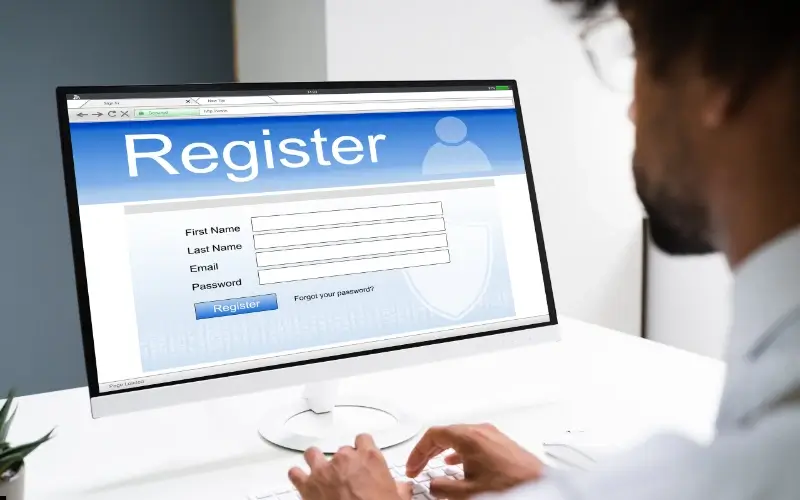
Flexible registration forms allow organizers to collect important information from job seekers before the event begins. This can include details like school, major, graduation year, work authorization, areas of interest, LinkedIn profiles, and resume uploads. Some platforms also allow organizers to add custom questions tailored to specific industries or roles.
Collecting this information upfront helps create structured candidate profiles that can be used throughout the event. It ensures organizers gather consistent data from every attendee and makes it easier to organize candidate information for reporting and follow-up after the event.
2. Built-In Resume Search, Filters, & Candidate Profiles
A strong career fair platform should include both detailed candidate profiles and powerful search tools. Candidate profiles store key information such as resumes, skills, graduation year, experience level, and other details collected during registration. Search and filtering tools allow recruiters to quickly sort through this information using their qualification criteria.
Instead of browsing long attendee lists, these tools allow recruiters to quickly identify candidates who align with specific roles. Recruiters can review candidate profiles in advance, invite promising candidates to conversations, and spend less time asking basic screening questions during the event.
3. Meeting Scheduler with Qualification & Pre-Screening Controls (1:1, Group & Drop-In Sessions)
A strong career fair platform should include a built-in meeting scheduler that allows candidates to book time with recruiters before the event begins. These scheduled meetings are typically organized through time slots, calendar integrations, and recruiter availability, allowing candidates to plan their schedule in advance and secure time with the employers they’re most interested in.
For candidates, scheduled meetings provide structure and increase the likelihood they’ll attend the event since they already have conversations planned. For recruiters, it helps create a clear plan for the day. Hiring teams can review candidate profiles ahead of time, invite promising candidates to book meetings, and prepare for more focused conversations.
Some platforms also allow recruiters to add qualification questions or screening criteria during the scheduling process. These filters can limit meeting bookings to candidates who meet certain requirements, such as graduation year, work authorization, or specific skills. This helps recruiters prioritize relevant conversations and ensures valuable meeting slots are reserved for candidates who best match the role.
However, scheduling alone shouldn’t define the entire experience. When every interaction must be booked in advance, a career fair can start to feel less like an event and more like a back-to-back calendar of interviews. The most effective platforms balance structured meetings with opportunities for spontaneous conversations and exploration across the event.
4. Free Movement & Open Exploration for Candidates
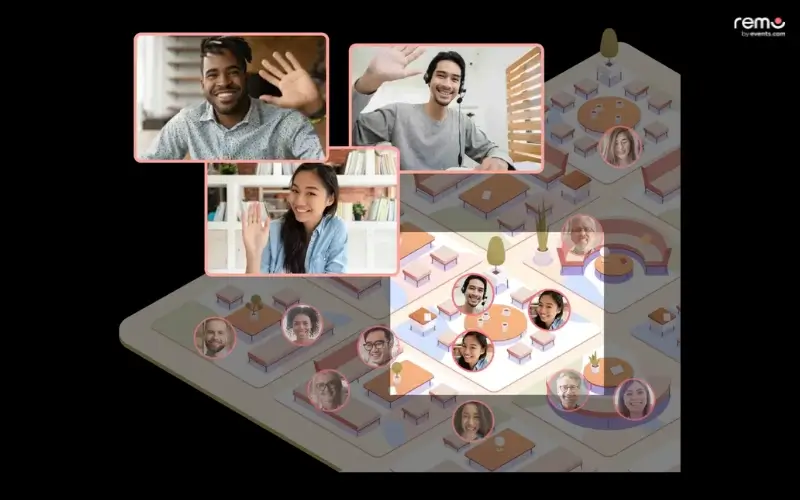
Free movement allows candidates to navigate the event environment naturally, moving between booths, live sessions, and different employer spaces without the rigid requirement of pre-scheduling every single second. Rather than being restricted to a static list of links, attendees can walk through an immersive floor plan, discover employers organically, and join open conversations as they happen.
Platforms that support open exploration recreate the experience of walking through a physical career fair, where candidates can browse booths, observe conversations, and approach recruiters when something catches their interest. This makes the event feel more dynamic and encourages broader engagement across the fair. Some platforms, such as Remo, are designed specifically around this type of interactive floor plan, allowing attendees to move freely between conversations and employer spaces in a way that closely mirrors an in-person event.
.webp)
5. Live Audio & Video Conversations
This feature provides the infrastructure for real-time, high-fidelity communication beyond simple text boxes. A true platform supports a spectrum of interaction: from private 1:1 video interviews for deep-dive screening to small-group breakout audio rooms for team introductions, and even spontaneous drop-in video chats where candidates can approach recruiters digitally as they would at a physical booth.
While some legacy platforms still rely heavily on text-based chat, platforms such as Remo, for example, structure conversations around virtual tables where small groups can interact through live audio and video along with live chat, creating a more natural networking environment than traditional chat-based formats. Career fairs are ultimately about conversations. Live audio and video allow for the nuances of tone, body language, and enthusiasm, helping recruiters build genuine rapport and sell the company culture more effectively than a typed response. For hiring teams, this makes it easier to evaluate candidates and move promising conversations forward.
6. Virtual Employer Booths
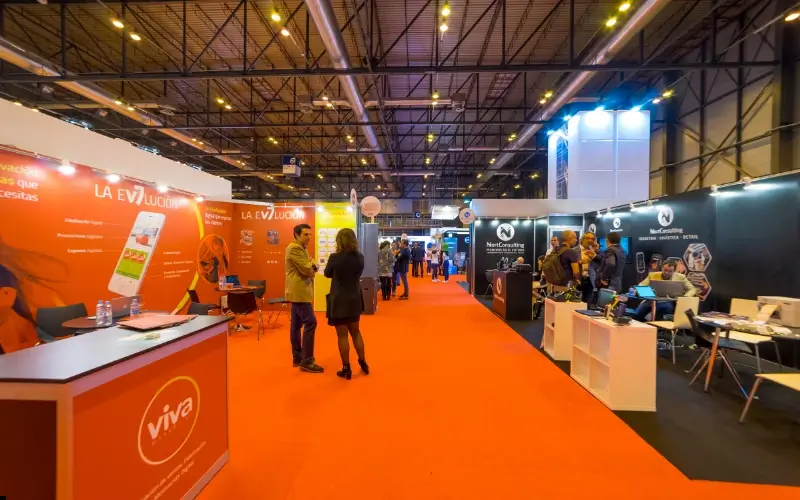
Virtual booths act as the main meeting point between employers and candidates during a career fair. Similar to physical booths at in-person events, they give recruiters a dedicated space where candidates can stop by, learn about the company, and start conversations.
In virtual environments on platforms such as Remo, booths can go beyond introductions by including job listings, company videos, and downloadable resources that candidates can explore on their own. When designed well, these spaces help structure the event experience and make it easier for candidates to discover opportunities, something many organizers achieve by experimenting with creative career fair booth ideas.
7. Webinars & Broadcast Sessions
A lot of career fairs have large group or workshop sessions scheduled throughout the fair alongside the main exhibition hall. So, the best career fair platforms also offer integrated live presentation tools. These are specifically designed for high-capacity employer info sessions, panel discussions, and day-in-the-life company overviews. Unlike a standard video call, these broadcast modules include moderated Q&A feeds, polling, and hand-raising features, allowing a small team of recruiters to engage with hundreds of candidates simultaneously in a structured, professional environment.
Platforms such as Remo offer a dedicated Presentation Mode for webinar-style sessions alongside Conversation Mode for networking, allowing organizers to easily switch between large-scale presentations and smaller group discussions depending on what the event requires.
8. Candidate Rating, Notes & Collaboration
During a busy career fair, recruiters need a quick way to capture their impressions. Built-in evaluation tools that allow recruiters to grade interactions as they happen. It includes standardized rating scales, private note-taking fields, and customizable tags (e.g., "Top Technical Talent," "Needs Follow-up," or "Culture Add"). These tools are integrated directly into the candidate’s digital profile, allowing for instant internal sharing and collaborative feedback among the hiring team members during and after the event.
Without a structured way to capture feedback, it’s easy for details to get lost or mixed up later. Candidate notes let recruiters quickly record impressions, flag promising candidates, and share internal notes/feedback. This feature can include standardized rating scales, private note-taking fields, and customizable tags (e.g., “Top Tech Talent”, “Needs Follow-up”, or “Culture Add”). Keeping this information within the platform also ensures that candidate insights remain organized and accessible when teams review prospects and plan next steps after the event.
9. Follow-Up Automation & Next Steps
Follow-up tools help recruiters move promising conversations into the next stage of the hiring process after the event ends. Many career fair platforms allow recruiters to send follow-up emails, share application links, schedule interviews, and organize next steps directly from within the platform.
These tools can also trigger communications based on recruiter actions or candidate engagement. For example, recruiters may send thank-you messages to candidates they spoke with, invite strong prospects to apply for open roles, or schedule follow-up interviews with shortlisted candidates. By keeping these follow-ups connected to the original conversation, platforms help recruiters maintain momentum after the event. Instead of relying on scattered notes or manual outreach, hiring teams can quickly turn career fair interactions into structured next steps within their recruiting pipeline.
10. Analytics & Event Reporting
Analytics dashboards help measure event performance through metrics such as registrations, attendance, booth visits, session participation, chat activity, resume downloads, and recruiter engagement. These insights are usually available during the event and through post-event reports.For event organizers, analytics help measure overall event success, such as attendance rates, engagement levels, and which employers or sessions attracted the most interest. These insights make it easier to improve future events and demonstrate value to stakeholders.
For recruiters, reporting focuses more on candidate outcomes. Metrics such as conversations held, resumes collected, and follow-up actions help hiring teams track how the event contributed to their talent pipeline. Platforms like Remo, for example, provide engagement insights that help teams understand which conversations and interactions generated the most meaningful connections. Clear reporting ensures both organizers and recruiters can evaluate results and make more informed decisions for future recruiting efforts.
11. Integrations & Data Portability
Integrations allow career fair platforms to connect with systems like Applicant Tracking Systems (ATS) or Candidate Relationship Management tools. Candidate data, resumes, and recruiter notes can then move directly into existing hiring workflows.
This prevents valuable information from remaining isolated within the event platform and allows recruiters to continue managing candidates through their usual hiring tools.
12. Mobile-Friendly Access
This feature ensures the platform is a fully responsive, browser-based environment that requires zero software downloads or specialized plugins.
Many candidates join career fairs while commuting, between classes, or during short breaks in their day.
If the platform requires complex setup or downloads, some attendees may drop off before the event even begins. A mobile-friendly experience removes these barriers and makes it easier for participants to join quickly. When access is simple and reliable across devices, attendance tends to be higher and overall engagement improves.
13. Accessibility, Privacy, & Security
Career fairs often involve sharing personal information such as resumes, contact details, and conversation notes. Organizers, candidates, and employers need confidence that this data is handled responsibly. Platforms should provide clear privacy controls so candidate information is stored, accessed, and shared appropriately throughout the recruiting process.
Strong security measures are equally important. Features such as data encryption, role-based access controls, and secure login protocols help protect sensitive information and ensure that only authorized users can access candidate data during the event.
Accessibility is another essential consideration. Platforms that offer WCAG 2.1 Level AA compliance for virtual career fairs support features such as keyboard navigation, screen reader compatibility, and live-captioning for video sessions. These capabilities help ensure that all participants can fully engage with the event experience regardless of accessibility needs.
14. Engagement Features (Gamification & Matchmaking)
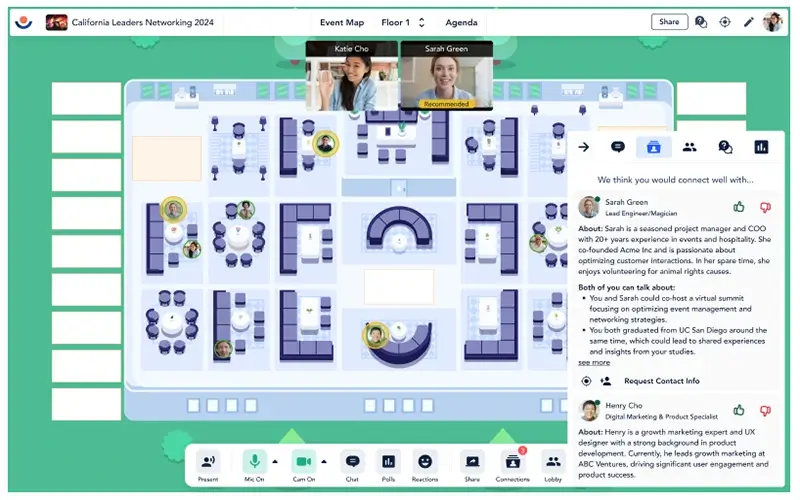
Some career fair platforms offer additional engagement features designed to make events more interactive. AI-based matchmaking helps connect candidates with employers or roles that match their skills and interests, making it easier for attendees to discover opportunities they may have otherwise overlooked. Some platforms, such as Remo with its Networking Recommendations, use intelligent recommendations to guide candidates toward relevant recruiters and sessions during the event.
Gamification elements, such as challenges, points, or leaderboards, encourage attendees to explore different booths and sessions across the event. This can increase engagement across the entire fair and help smaller or niche employers gain visibility alongside more popular companies.
Some career fair platforms also offer immersive event layouts that allow participants to move through virtual spaces more naturally. Platforms like Remo, for example, use interactive floor plans that let attendees move between virtual tables and conversations freely, helping recreate the spontaneous networking that happens at in-person events.
15. Queue Management & Traffic Flow Controls
Queue management features utilize virtual waiting rooms, session capacity caps, and recruiter load balancing to manage the flow of attendees in real-time. With this feature, instead of a chaotic free-for-all, candidates are placed in structured queues with visible wait times, while the system intelligently routes the next person in line to the first available recruiter who matches their profile or interest area.
Some platforms like Remo also structure conversations around smaller table groups rather than long queues, helping distribute attendees more naturally across conversations. This way, candidates can also make the most of their time by exploring other booths while waiting for their turn.
Vendor Demo Checklist: 10 Questions to Ask
Choosing a career fair platform often involves watching polished demos and feature walkthroughs. While these presentations highlight the platform’s strengths, it’s important to ask practical questions that reveal how the system will perform during a real event. The following questions can help organizers and recruiters evaluate whether a platform truly supports their needs.
- Can the platform support multiple interaction formats in one event? For example, can you run 1:1 meetings, group sessions, and drop-in conversations simultaneously?
- How do attendees book time with recruiters? Are conversations scheduled in advance, and how does the system prevent overbooking?
- What features are included in the employer booth by default? Does it support branding, job listings, downloadable resources, and team introductions?
- Can recruiters rate, tag, and add notes about candidates? And can those insights be exported or shared with hiring teams afterward?
- Who owns the event data and when can it be accessed? Is candidate information available immediately, or only after the event ends?
- What integrations are available with existing recruiting tools? Are they native integrations, API connections, or manual exports?
- What analytics are available during and after the event? Can organizers track engagement, attendance, and recruiter activity in real time?
- What accessibility features does the platform support? For example, captions for live sessions, keyboard navigation, or screen reader compatibility.
- What kind of event-day support is provided? Is there live support through chat or phone, or a dedicated customer success manager?
- How does the platform handle unexpected technical issues? For example, what happens if a recruiter or candidate disconnects during a conversation?
Asking these questions during vendor demos can help ensure the platform supports both smooth event execution and effective candidate engagement.
From Conversations to Hiring Outcomes
Too often, career fairs generate plenty of conversations but very few actual hiring outcomes. Recruiters meet dozens of candidates, notes get scattered, follow-ups slip through the cracks, and the momentum from the event quickly fades.
The right platform helps prevent that. Instead of just hosting conversations, it keeps interactions organized, captures useful data, and makes it easier to move promising candidates forward after the event.
Platforms like Remo are designed to make networking feel more natural while still giving recruiters the structure they need to track conversations and follow up effectively. The result is a career fair experience that not only drives engagement but also helps turn conversations into real recruiting opportunities. Want to see how it works? Book a demo and explore how Remo can help you run more engaging and effective career fairs.
Frequently Asked Questions about Virtual Career Fair Platform Features
1. Do career fair platforms allow candidates to explore employers freely?
Some career fair platforms support open exploration, allowing candidates to move freely between booths, sessions, and conversations without scheduling every interaction in advance. This approach recreates the experience of walking through a traditional career fair and encourages more spontaneous connections. Others….
2. How many attendees can join a virtual career fair?
Capacity depends on the platform, but many platforms support hundreds or even thousands of participants simultaneously. Some platforms allow multiple halls or rooms so larger events can run without overcrowding.
Aniqa Iqbal
Aniqa is a content writer at Remo, where she merges her love for storytelling from movies and TV shows with her passion for creating compelling content. With a knack for blending pop culture references and relatable narratives, Aniqa crafts content that informs and resonates deeply with readers. She aims to strike a chord with her audience, fostering genuine connections through words that inspire, engage, and entertain. When she's not writing, Aniqa can be found binge-watching her favorite shows, always on the lookout for the next story to tell.