What Is a Virtual Event Platform? How It Works, Features, and Uses in 2026

.png)
A virtual event platform is software used to create and host interactive online events such as conferences, networking sessions, trade shows, career fairs, and workshops. It brings content, attendee participation, networking, and event management into one connected online environment.
Virtual event platforms also vary in scope. Some are optimised for specific event formats, while others are designed to handle more complex agendas. A webinar-focused platform may be enough for a one-way presentation, whereas a conference with parallel sessions, networking, exhibitor areas, and sponsors may require a broader virtual conference platform.
This guide explains what is a virtual event platform, how it works, the features it includes, how it differs from webinar and video-conferencing software, and what organisers should look for when choosing one.
{{table-of-contents}}
What Does a Virtual Event Platform Do?

A virtual event platform helps organisers do four main things: deliver content, enable participation, create connections, and manage the event. Instead of putting every attendee into one video call, it gives organisers a broader environment that can support different sessions, conversations, and activities.
Think of a video call as one meeting room where everyone joins the same conversation or presentation. A virtual event platform is closer to the entire venue, giving attendees different places to go depending on what they want to do. Depending on the event, that might include a main stage, breakout rooms, networking areas, exhibitor spaces, and resource centres.
What Types of Events Can You Host on a Virtual Event Platform?
A virtual event platform can support a range of event formats, with the setup depending on how attendees need to participate, interact, and move through the event. Common examples include:
- Virtual conferences: Multiple stages, breakout sessions, speaker presentations, and networking spaces.
- Virtual networking events: Small-group conversations, free attendee movement, and one-to-one interactions.
- Trade shows: Exhibitor spaces, product information, multi-media demonstrations, and attendee conversations.
- Career fairs: Dedicated employer spaces where recruiters can meet and speak with candidates.
- Workshops: Presentations combined with breakout discussions and collaborative activities.
- Product launches and internal events: Live presentations, Q&A, networking, and supporting resources.
- Hybrid events: An online experience for remote attendees alongside the in-person event.
What Is the Difference Between a Virtual Event, Platform, and Venue?
A virtual event is the gathering itself. A virtual event platform is the software used to create and host it. The virtual venue is the attendee-facing digital environment inside that platform, including the stages, rooms, virtual tables, and other spaces guests can access.
How Does a Virtual Event Platform Work?
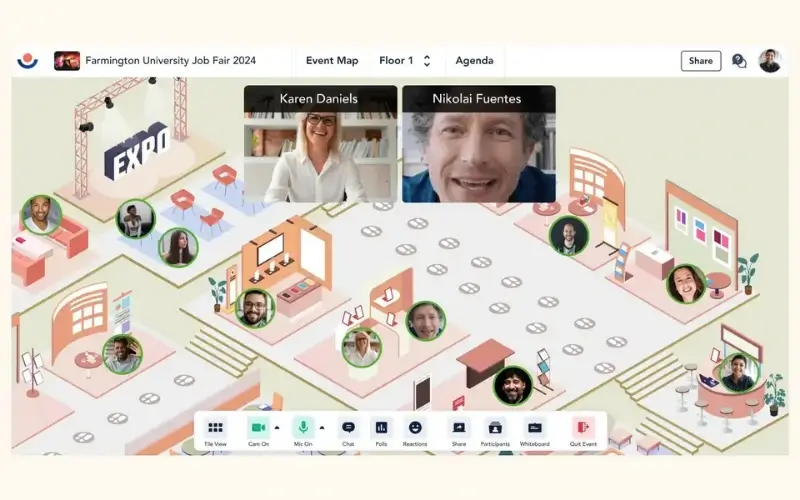
The best virtual event platforms provide the technology and controls needed to manage the event from setup through live delivery and post-event follow-up. This section looks at how that process works before, during, and after the event, and what organisers can manage at each stage.
Before the Event
Before the event, a virtual event platform helps organisers set everything up in one place. That includes building the agenda, adding speakers or sponsors, setting up online event registration, and deciding how attendees will join.
It also helps organisers stay in touch with people who have registered. Since getting sign-ups is only part of the job, reminder emails and confirmations can help improve show-up rates. Remo, for example, can send these automatically, so organisers do not have to manage every message themselves.
Organiser Tip: Test the complete registration-to-entry journey before launch. Different platforms handle login, account creation, downloads, permissions, and event access differently, so make sure joining the event is as friction-free as possible.
During the Event
During the event, the virtual event platform helps organisers deliver the live programme and guide attendees through each part of it. Depending on the event, that might include presentations, breakout sessions, networking, workshops, or exhibitor areas.
Different platforms handle that movement in different ways. Remo, for example, lets hosts switch between Presentation Mode for speaker-led sessions and Conversation Mode for networking at virtual tables. Other platforms, such as RingCentral Events, give attendees more freedom to move between different areas themselves.
The right setup depends on how structured you want the event to feel. A tightly planned agenda may need more host control, while a larger conference may work better when attendees can choose where they go.
After the Event
Once the live programme ends, organisers may use the platform to share recordings and resources, collect attendee feedback, and review attendance or engagement data. Remo, for example, provides post-event analytics on attendance, engagement, connections made, content interactions, and attendee feedback, with data that can also be exported for further analysis. Those insights can then inform follow-up communications and future event planning.
What Features Does a Virtual Event Platform Include?
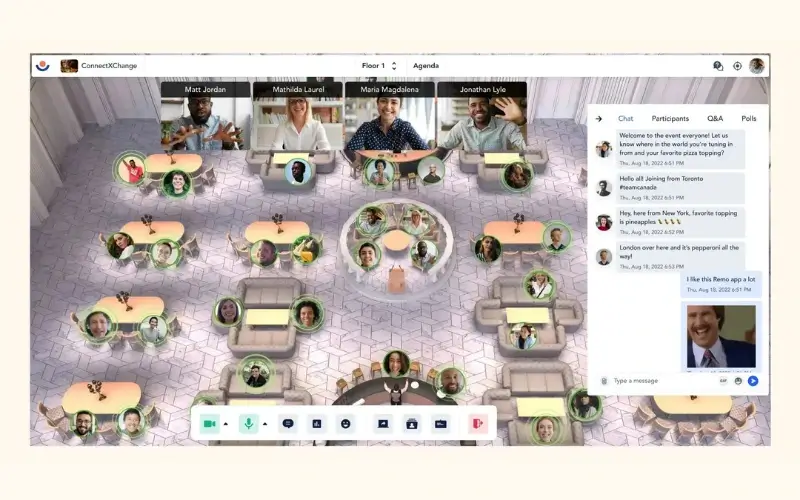
The features you need in your virtual event platform depend on what you want attendees to watch, do, and experience during the event. A keynote-heavy conference may prioritise reliable content delivery, while a networking event needs tools that make it easy for attendees to find and speak with other people.
Most virtual event platform features fall into four broad areas: delivering content, enabling participation, creating connections, and managing the event.
Features for Delivering Content
Content-delivery features determine how organisers can present information and support different speakers, sessions, and tracks. Useful capabilities may include:
- Virtual stages for keynotes, presentations, and main-stage programming.
- Concurrent stages or session rooms for events running several tracks at the same time.
- Speaker and panel controls that support multiple presenters, interviews, and panel discussions.
- Screen and video sharing for slides, demonstrations, videos, and other supporting content.
- Live, pre-recorded, or simulive delivery so organisers can combine different presentation formats.
- Recording and livestreaming for on-demand viewing or distribution beyond the event platform.
For organisers running a complex agenda, it is worth checking not only whether these features exist but also how many stages, sessions, presenters, or streams can run simultaneously.
.webp)
Features for Enabling Participation
Keeping attendees engaged can be harder at a virtual event because it is much easier to get distracted when you are joining from a laptop or phone. That makes planned moments of interaction an important part of the event experience.
A good virtual event platform should give organisers several ways to involve attendees, so they can choose the right type of interaction for their audience and session. Useful capabilities may include:
- Live chat and reactions for quick responses and ongoing conversation.
- Q&A tools for collecting, moderating, and answering attendee questions.
- Polls and surveys for gathering opinions, feedback, or audience input in real time.
- Collaborative activities for workshops, exercises, and other hands-on sessions.
- Gamification for quizzes, challenges, points, or other activities that encourage participation.
- Audience stage access that lets attendees join speakers on screen during panels, workshops, or discussions.
For more interactive events, look beyond how many engagement features a platform offers and consider whether they fit the way your audience actually wants to participate.
Features for Creating Connections
Networking is one of the easiest parts of an in-person event to take for granted. People naturally strike up conversations, move between groups, and follow up with someone they want to know better. Online, that same experience has to be designed more deliberately. A good virtual event platform should make those connections feel just as easy and natural.
Useful networking capabilities may include:
- One-to-one video meetings for more focused conversations.
- Virtual tables or breakout rooms for small-group discussions.
- Attendee profiles to help people find others with relevant roles, interests, or backgrounds.
- Direct messaging for private conversations during or after the event.
- Matchmaking tools for connecting attendees based on shared interests or goals.
- Free movement between conversations so attendees can choose where to go and leave when a discussion is no longer relevant.
For networking-heavy events, it is worth checking not only whether these features exist, but how naturally attendees can use them. The best experience should feel less like being assigned to a breakout room and more like choosing who to speak with at an in-person event.
Features for Managing the Event
Event-management features give organisers the controls they need to set up, run, and measure the event. Depending on the platform, these can include:
- Registration, ticketing, and access controls to manage sign-ups, ticket types, permissions, and who can enter particular sessions or spaces.
- Agenda and session management to schedule speakers, presentations, workshops, and simultaneous tracks.
- Host and moderator controls to manage attendee permissions, move the event between activities, moderate conversations, and respond to issues during the live programme.
- Custom branding for event pages, virtual spaces, logos, colours, and other attendee-facing elements.
- Sponsor and exhibitor management for dedicated spaces, branded content, downloadable resources, and lead-generation opportunities.
- Attendee communications such as confirmation emails, reminders, announcements, and event updates.
- Analytics and reporting to track registrations, attendance, engagement, session participation, and other event activity.
- Integrations with CRM, marketing, registration, and other tools so attendee and event data can move between systems.
- Accessibility and device support such as captions, browser access, and mobile compatibility to make participation easier across different audiences.
Not every event needs every capability. The best fit should make participation straightforward for attendees while giving organisers enough control, visibility, and data to manage the event from setup through follow-up.
How Is a Virtual Event Platform Different from a Webinar or Video Conference?
Video conferencing, webinar software, and virtual event platforms all connect people online, but they are designed for different levels of event complexity. A video-conferencing tool typically supports one shared meeting, while webinar software is built mainly for presenter-to-audience broadcasts. A virtual event platform can support a more complex event agenda with multiple presenters, simultaneous sessions, networking spaces, exhibitor areas, and different activities within the same event environment.
The difference is not simply audience size. A 50-person networking event may need a full virtual event platform because guests need to move between conversations, while a broadcast to several thousand people may only need webinar software if everyone is watching the same presentation.
A useful rule is: use a virtual event platform when attendees need to do more than enter one room and watch one session.
If your event has one presentation, limited interaction, and no need for networking or multiple spaces, simpler software may be enough. A full platform becomes more useful when the attendee journey includes different sessions, conversations, exhibitors, activities, or resources.
How Do You Choose the Right Online Event Platform?

Choose an online event platform by defining what attendees need to accomplish, then checking whether the platform supports that journey with minimal friction. When comparing virtual event software, relevant capabilities matter more than the total number of features advertised.
Start With Your Event Goal
Identify the main outcome you want from the event. That may be delivering content, generating leads, facilitating networking, recruiting candidates, training employees, building a community, or increasing sponsor visibility. Then prioritise the platform capabilities that directly support that outcome.
Test the Attendee Journey
Look at the event from an attendee’s perspective. How easy is it to register, log in, find a session, move between spaces, join a conversation, and get help? Downloads, complicated login processes, or confusing navigation can create friction before an attendee has even participated.
For networking-led events, pay particular attention to whether attendees can discover other people, choose where to go, and move between conversations without constant host intervention.
It is also worth asking vendors to demonstrate your actual event journey. Instead of asking whether a platform “supports networking,” ask them to show how 200 attendees would leave a keynote, enter 20 small-group conversations, and then return to the main stage. That reveals much more about the attendee experience than a feature checklist.
Check the Technical and Operational Fit
Confirm that the platform can support your expected attendance, concurrent sessions, interactive video requirements, accessibility needs, devices, integrations, and moderator controls.
Also check the limits that apply to specific activities. A platform’s overall event capacity may be different from the number of people it can support simultaneously in interactive video or networking spaces.
Calculate the Full Cost
Look beyond the advertised subscription virtual event pricing. Attendee limits, custom branding, integrations, recording storage, training, support, and event-day assistance can all affect the total cost of a virtual event.
For more information about software costs, our virtual event platform pricing comparison breaks down what different platforms charge and what organisers get for their budget.
Choose a Platform Around the Attendee Experience
A virtual event platform brings content delivery, participation, connection, and event management into one online environment. But choosing the right one comes down to something simpler: what do attendees actually need to be able to do?
For a broadcast-led event, that may simply mean accessing reliable content. For networking-led events, it means being able to find people, join conversations, move between groups, and participate without unnecessary friction.
Remo is built around that more interactive kind of experience, giving attendees the freedom to move between virtual spaces and connect in smaller groups. If attendee participation and networking are central to your event, book a demo to see how Remo can support it.
Frequently Asked Questions About Virtual Event Platforms
1. How many attendees can a virtual event platform support?
Capacity varies by platform and by activity. For example, Remo can support up to 1,000 attendees per event; scalable by plan. Be careful though, a platform may support a large audience for broadcast sessions but fewer attendees in interactive video, breakout rooms, or networking spaces. Check overall event capacity and activity-specific limits separately.
2. Do attendees need to download virtual event software?
Not always. Some virtual event platforms run entirely in a web browser, while others require an app or desktop software. Organisers should test device compatibility, camera and microphone permissions, firewalls, and corporate-network restrictions before the event.
3. Can a virtual event platform support a hybrid event?
Yes. A virtual event platform can provide streamed sessions, digital resources, networking, and audience interaction for remote attendees. The online experience should be designed deliberately rather than treated as a passive livestream of the physical venue. Check out our guide to running hybrid events for more information.
4. How much does a virtual event platform cost?
Pricing varies according to audience size, event frequency, required features, branding, storage, integrations, and support. Compare the total cost of running the event rather than relying only on the provider’s advertised starting price.
5. What should I look for in a virtual event platform?
Look for a platform that matches your event format, audience size, interaction needs, and technical requirements. Important factors include ease of use, networking options, session management, branding, analytics, integrations, and attendee movement between different event spaces. For events where networking and small-group interaction are a priority, Remo is a strong option because attendees can move freely between virtual tables and conversations while organisers retain control over the wider event experience.
Aniqa Iqbal
Aniqa is a content writer at Remo, where she merges her love for storytelling from movies and TV shows with her passion for creating compelling content. With a knack for blending pop culture references and relatable narratives, Aniqa crafts content that informs and resonates deeply with readers. She aims to strike a chord with her audience, fostering genuine connections through words that inspire, engage, and entertain. When she's not writing, Aniqa can be found binge-watching her favorite shows, always on the lookout for the next story to tell.